
| SpaceClaim Online Help |
|
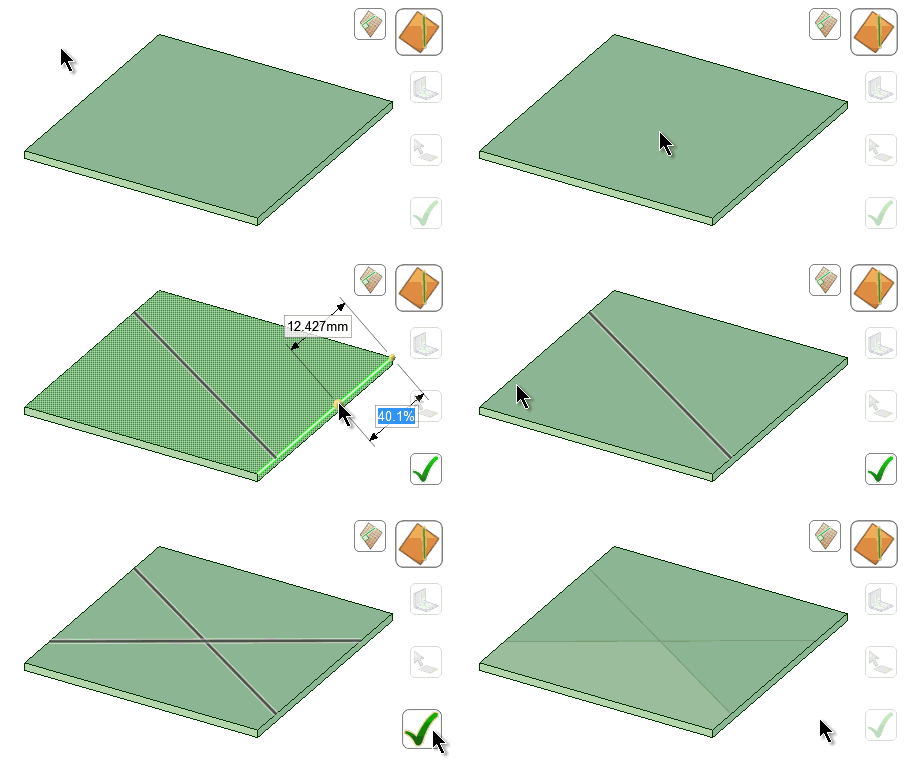
Cross breaks are a cost effective method for strengthening a thin piece of sheet metal. Typically, this is done in an X shape, however two lines crossing at most angles will add strength.
Enter the Bend tool.
In the Options panel , click
  CreateCross Break.
Select Cutter Point is the default tool guide. When you mouse over an edge, you see a preview of the bend line and its location. Click anywhere along the edge to place a bend line perpendicular to the edge across the entire face.
The Select Two Cutter Points tool guide lets you select both bend line endpoints to produce different angles.
Click Complete once you have created two crossing bend lines.
SpaceClaim shows the cross break as triangular shaded areas on the face.
© Copyright 2014 SpaceClaim Corporation. All rights reserved.