
| SpaceClaim Online Help |
|
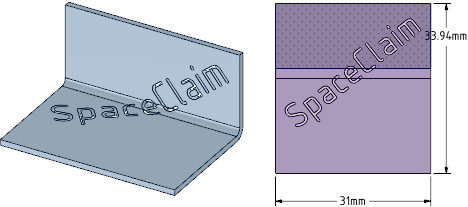
A note is text that is engraved or cut out of the sheet metal part when it is fabricated. The special sheet metal note can only be created, edited, moved, or deleted in the flattened state, but you can see it in the folded state. The text can cross bends, as shown in the example below.
You can only create lightweight notes, which means they are rendered simply and don't require as many resources as normal rendering. Their faces cannot be edited directly; you can only change the text by changing the note.
Unfold the sheet metal part.
Click  Note
Note in the Annotation group on the Detail tab.
Click on the face where you want to place the note.
Click again to place the note.
Type the note text.
Right-click the note text and select Convert To Lightweight > Cutout or Engraving.
You can change the note text like a normal annotation note. See Formatting note text.
Right-click the note text and select Convert To Note.
© Copyright 2015 SpaceClaim Corporation. All rights reserved.